Show it, don't explain it.
LoopShot records any part of a web page, a whole tab or your whole screen as a crisp, tiny GIF. Perfect for bug reports, docs, pull requests and product demos. Drag, record, share.
Free for 5-second GIFs · Pro is pay what you want
How it works
Three steps, no editing
1
Select an area
Click the icon or press Alt+Shift+G and drag over what you want to show, or record the whole tab or your whole screen in one click.
2
Record
A 3-2-1 countdown, then use the page as usual. Your clicks are highlighted so viewers can follow along.
3
Share
Your GIF opens in a new tab with a preview, its size and a Download button. Drop it into Slack, GitHub or a doc.
Why LoopShot
Small files, sharp pixels
- Area, tab or whole screenDrag an area, pick an element, record the whole tab, or record your entire screen or any app window.
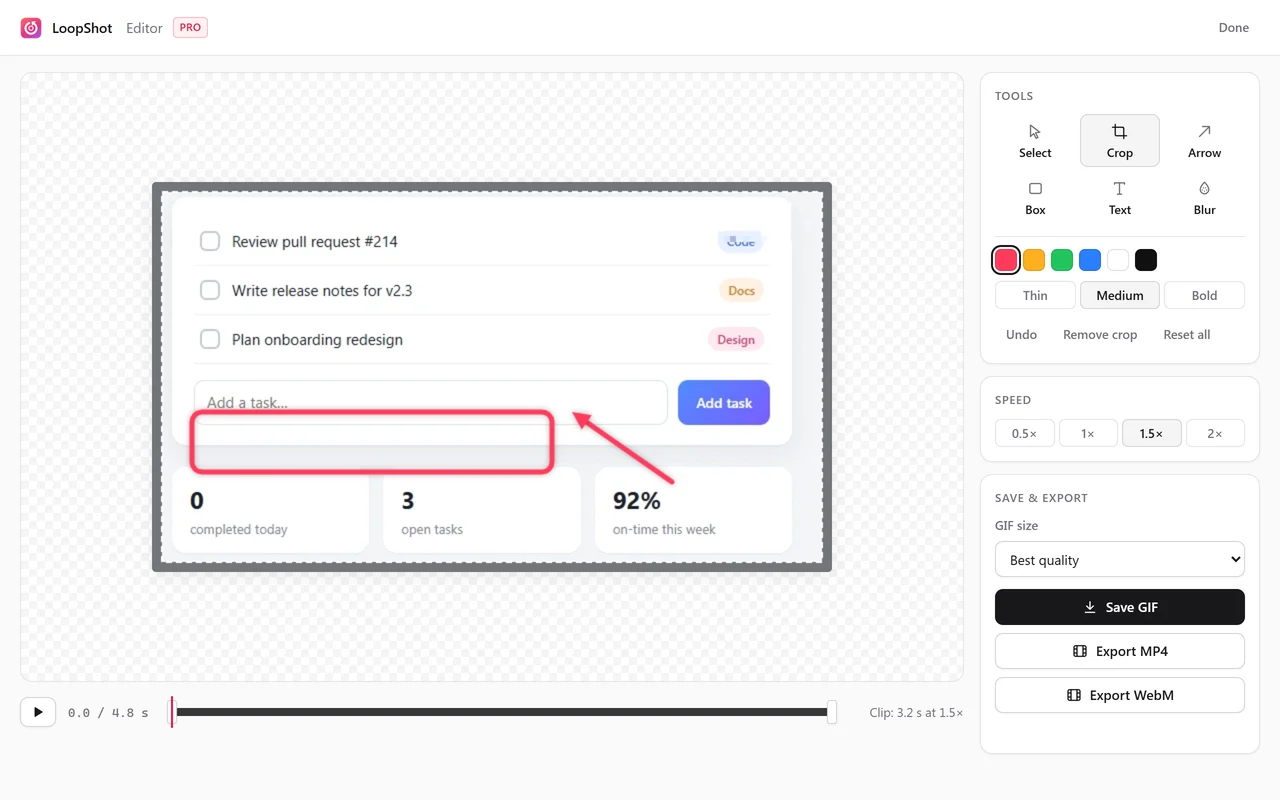
- Built-in editorTrim, crop and change speed. Pro adds arrows, boxes, text and blur for hiding emails and keys.
- GIF, MP4 or screenshotSave GIFs sized for Slack, Discord or email, export MP4 and WebM video (Pro), or grab a PNG screenshot.
- Cursor, clicks and keystrokesYour pointer and clicks are drawn in. Pro adds a cursor spotlight and on-screen shortcuts like Ctrl + K. Passwords are never shown.
- Tiny GIFsOnly the pixels that change are stored, so screen recordings stay a fraction of the usual size.
- Sharp on Retina screensRecords at your screen's full resolution, with a palette tuned for every frame.
- Controls stay out of the shotThe Stop button sits outside the recorded area and never shows up in your GIF.
- Share links (Pro)Upload a GIF in one click and paste the link anywhere. Slack, Discord and X show it right in the preview.
- PrivateEverything happens on your computer. Nothing is uploaded unless you choose to share. No accounts or tracking.
Pricing
Free to start. Pro is pay what you want.
Unlock Pro from inside LoopShot and pay whatever it's worth to you. No subscription, no account.
Free
$0
- GIFs up to 5 seconds
- 15 fps, up to 800 px wide
- Trim, crop and speed
- Screenshots and size presets
- Small LoopShot watermark
Pro
You choose pay what you want
- GIFs up to 15 seconds
- Up to 50 fps and 1600 px wide
- No watermark, or your own
- Arrows, text, boxes and blur
- MP4 and WebM export
- Share links, join clips
- Cursor spotlight and keystrokes
Questions?
Lost key, a page that won't record, or anything else.